

Write the definition beside the metric
Record the source report, included population, period and units. State whether the measure is a count, period activity, ending balance or rate.
For a rate, identify both numerator and denominator and make sure they refer to a compatible population. Avoid a label such as “collections” when different reviewers might interpret it as cash received, posted payment or reduction in open balances.
Distinguish a stock from activity
An ending A/R balance describes a point in time; posted payments describe activity over a period. They can inform the same review but are not interchangeable. Likewise, an aging distribution reflects the selected report settings rather than a universal definition.
Preserve those settings and explain changes in the population. Otherwise a filter change can look like operational improvement even when the underlying workflow did not change.

Move from the question to the next action
Reconcile before interpreting
Where relevant, connect payment activity to the practice’s remittance and deposit reconciliation process. An adjusted balance may fall without cash being collected. Investigate mismatches and identify what remains unexplained before drawing a conclusion.
Do not invent an industry threshold to color a dashboard. A practice-specific target should have a named owner and a clear rationale, separate from the observed source data.
Use comparisons that share a definition
Check whether locations or periods have different service mixes, report cutoffs or inclusion rules. Explain material differences and avoid ranking from mismatched measures.
If source data is unavailable, show that gap rather than substituting zero. A count of reviewed items and a count of all eligible items answer different questions, so keep the denominator visible when discussing a sample-based result.
Connect the number to a decision
Choose a limited set of measures that help assign work or investigate a question. Pair a material change with the relevant source context, unresolved dependencies and next owner.
The denial and A/R workbook’s active-item and balance summaries describe only its entered operational sample; they are not practice-wide financial KPIs. Use the practice’s authorized reports for actual performance review and preserve the calculation method when the dashboard is updated.
Illustrative workflow
A practical example.
Fictional workflow: two locations report different “collection” totals. One includes posted payments during the month; the other reports open-balance reduction. The manager preserves both source definitions and creates a comparable review before discussing the difference. The team then investigates the actual unresolved work instead of interpreting the original numbers as a ranking of staff or location performance.
Put it into practice
- State population, source, period and units.
- Keep the rate denominator and source coverage visible.
- Compare like definitions and explain unresolved differences.
Inside the workbook
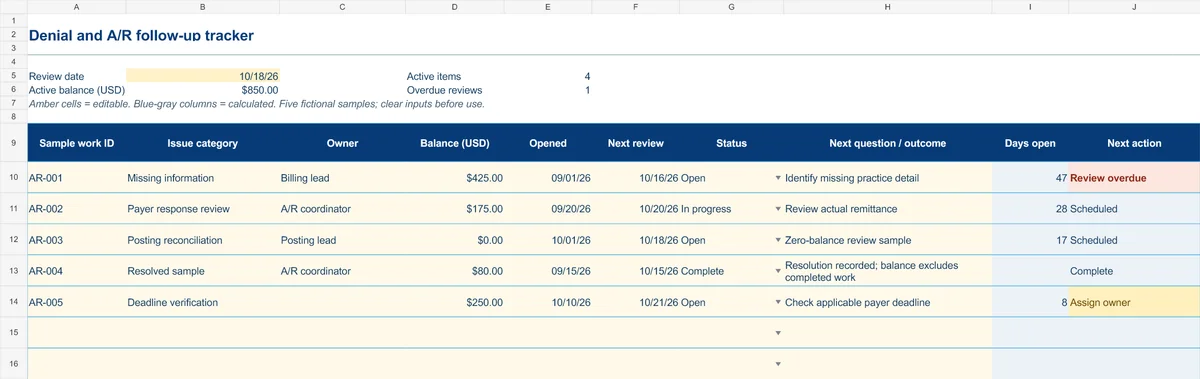
Start with the Instructions tab. Replace the five fictional samples, set your review date and keep the formula columns intact.
Free XLSX tool · No signup
Denial & A/R follow-up tracker
Plan anonymous follow-up work and make overdue reviews and missing owners visible.
- Fictional USD balances and active-balance summary
- Review dates chosen by your practice
- Calculated active items, age and next actions
Use anonymous process tasks. Keep PHI in approved systems. Includes instructions and fictional samples; no macros or live data connection.