
Identify the enrollment project and program
List the clinician or organization, relevant locations and payer products in the approved project record. A Georgia Medicaid project is not interchangeable with Medicare enrollment or a commercial plan process.
Georgia DCH identifies GAMMIS as a resource for provider enrollment and other program functions. Use the official route for the actual project rather than relying on a generic application checklist copied from another state.
Prepare facts with one practice owner
Agree who confirms the provider and entity information, supplies supporting material and authorizes the submission. Keep current source records in the approved secure repository.
The coordinator should know which details remain unconfirmed before the work is sent onward. A well-organized project can still wait on a practice decision, so the tracker should show that dependency instead of suggesting that submission is ready because most fields are populated.

Move from the question to the next action
Track evidence for each stage
Information gathering, submission, a returned question and written outcome should remain distinguishable. Preserve the source references and any applicable dates through the program’s actual instructions.
Do not treat a receipt as an effective-date determination or a guarantee of payment. If a response answers one question while leaving another open, assign the remaining question explicitly and retain the evidence for what has been confirmed.
Make the closeout useful to billing
Prepare an operational handoff naming the applicable provider, entity, location and product, with the confirmed outcome and any unresolved limitation. Scheduling and billing need facts they can use and a contact for clarification.
A broad announcement that enrollment is complete may hide a separate program or payer question. Preserve the actual scope so staff do not apply one project’s outcome to unrelated services or locations.
Discuss remote coordination without assuming coverage
The free register can organize anonymous administrative milestones and review dates; sensitive credential material belongs in approved systems. Atlanta practices can discuss their needs with SBS in Jacksonville to determine whether a remote support arrangement fits the actual workflow and program requirements.
The guide does not claim an Atlanta office or a Georgia payer relationship. Keep the business scope and access arrangements explicit before detailed record exchange begins.
Illustrative workflow
A practical example.
Fictional Atlanta workflow: a group prepares a new provider project and initially treats all payer work as one application. The coordinator separates the program routes, names the practice approver and tracks each source response. Billing receives a product-specific closeout rather than one broad status. An unresolved effective-date question stays assigned until the appropriate source provides the needed confirmation.
Put it into practice
- Use Georgia’s official route for the relevant program.
- Preserve practice approval and stage-specific evidence.
- Give operations a product-specific outcome handoff.
Inside the workbook
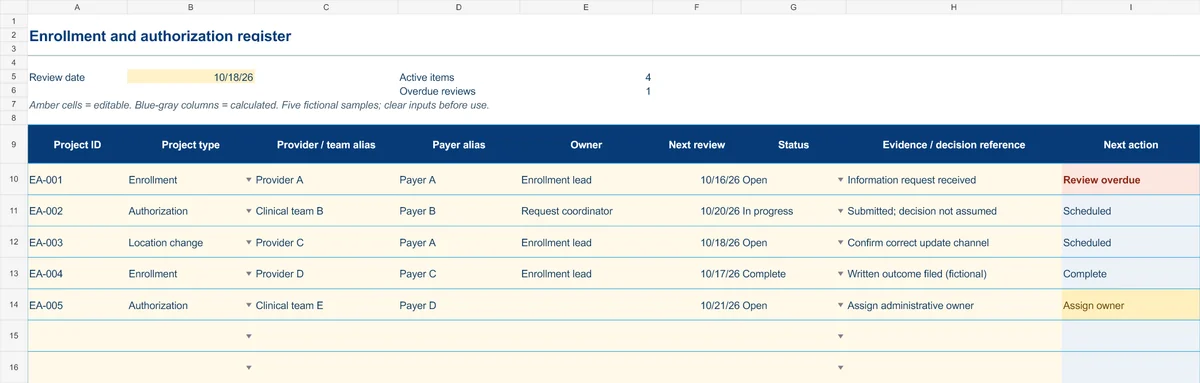
Start with the Instructions tab. Replace the five fictional samples, set your review date and keep the formula columns intact.
Free XLSX tool · No signup
Enrollment & authorization register
Track administrative projects from information gathering to a documented outcome.
- Project-type and status dropdowns
- Provider/team aliases and outcome references
- Calculated reminders for ownership and reviews
Use anonymous process tasks. Keep PHI in approved systems. Includes instructions and fictional samples; no macros or live data connection.