

Create a location and responsibility map
Identify the locations and entities actually represented in the billing workflow. Name the source for provider and location details and who approves changes.
A location name used by scheduling may differ from the label in a report, so make the relationship clear in the authorized reference. This map is an operational control, not an assumption that every provider has the same payer participation at every site.
Align the reporting population
Before comparing locations, record service periods, report filters and whether the measure is payment activity or an ending balance. Check which payer products and work queues each report includes.
A mismatch may come from definitions rather than an operational failure. Preserve the original reports and explain intentional differences so a later reviewer can reproduce the comparison without relying on a screenshot of a headline total.

Move from the question to the next action
Reconcile shared and local handoffs
Identify which tasks a central team owns and which require a location contact. Missing intake information, a documentation question and a posting discrepancy may need different recipients.
Route the specific question rather than sending every unresolved balance to the site manager. Keep the response owner and next review visible, and retain detailed patient and claim information in approved systems rather than a general multi-location spreadsheet.
Use the applicable program references
For Florida Medicaid workflow questions, begin with AHCA’s official provider resources and confirm the actual plan and service requirements. Payment and adjustment interpretation may need the relevant remittance source and approved posting process.
Neither a shared Florida location nor a common payer brand proves identical routing for all work. Qualified reviewers should document the source and scope of any payer or billing determination.
Review the operating model with support partners
The internal medicine tracker can coordinate anonymous cross-location exceptions and review dates. Use it to assign process work, not to create a combined patient ledger.
Discuss the actual locations, payer mix and central/local responsibilities with Jacksonville-based SBS when evaluating remote support. The scope should follow the practice’s records and approved access needs; this guide does not represent a separate SBS office in Tampa Bay.
Illustrative workflow
A practical example.
Fictional Tampa Bay workflow: one location reports higher open balances than another. The review finds different payer filters and a central posting queue included in only one report. After aligning the comparison, the manager identifies a genuine local intake-handoff issue. The resulting action addresses that process, while the reporting correction is documented separately from any claim or payment outcome.
Put it into practice
- Map actual entities, providers and location labels.
- Compare the same report populations and measures.
- Assign central and local decisions to the right owners.
Inside the workbook
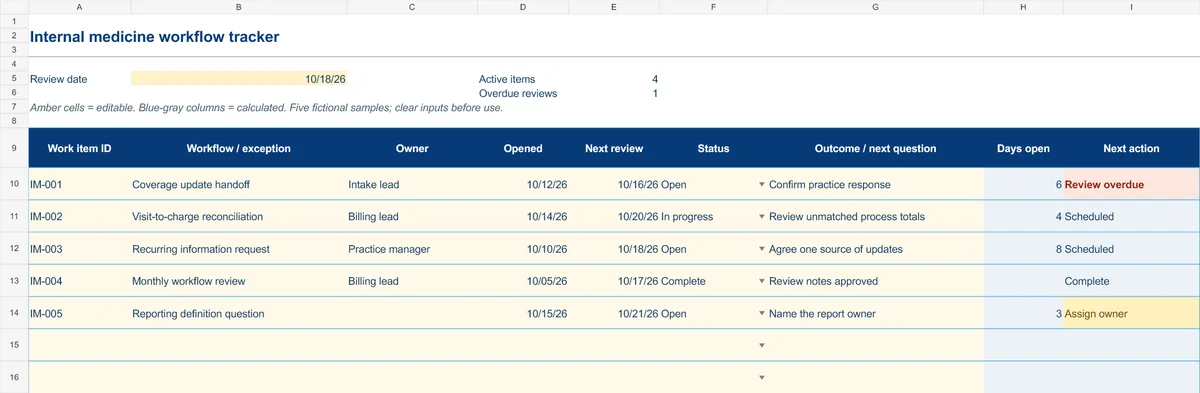
Start with the Instructions tab. Replace the five fictional samples, set your review date and keep the formula columns intact.
Free XLSX tool · No signup
Internal medicine workflow tracker
Coordinate recurring administrative exceptions, responsibilities and follow-up.
- 50 prepared operational work-item rows
- Opened date, next review and outcome notes
- Calculated days open and next actions
Use anonymous process tasks. Keep PHI in approved systems. Includes instructions and fictional samples; no macros or live data connection.