
Start with the program and product identity
Identify the actual Medicaid workflow and relevant product in the approved records. A broad internal payer label can conceal different contacts or submission routes. AHCA describes Florida Medicaid provider services and directs providers to program resources.
Use that official starting point, then confirm the applicable plan and service instructions. Do not assume a city-specific rule exists simply because the practice is in Miami.
Separate enrollment and operational follow-up
Keep provider enrollment questions distinct from a claim response, an authorization request or an information update. They may need different owners and evidence.
A submitted application does not answer every network or billing question, and a claim status does not confirm provider participation. Preserve the relevant written source and route the specific unresolved question to the person who can interpret or resolve it.

Move from the question to the next action
Create a product-specific routing reference
For the products the practice actually uses, record where staff find current guidance, who confirms updates and which team answers exceptions. Keep access-controlled details in the appropriate practice systems.
A public-facing or general spreadsheet should use aliases and operational milestones rather than beneficiary information. The reference should point staff to current sources, not embed an unreviewed excerpt that becomes obsolete after a payer update.
Communicate changes across the practice
When a route or status changes, identify who tells scheduling, intake and billing and how receipt is confirmed. Use a fictional exception to test whether the right contact receives the question.
An instruction that remains only in an enrollment specialist’s email may never reach the person preparing the next claim. Preserve the approved change and its scope so staff do not generalize it to unrelated products.
Scope remote support around the actual work
The free enrollment and authorization register can organize anonymous project owners, next reviews and outcome references. It does not establish eligibility or make a program decision.
Practices in Miami can discuss their location, payer mix, approved systems and administrative needs with Jacksonville-based SBS to confirm service fit. This educational guide represents no separate Miami office, payer contract or completed local engagement.
Illustrative workflow
A practical example.
Fictional Miami workflow: staff route every Medicaid question to one general inbox. The manager separates an enrollment update from an authorization-information request and a claim-follow-up question. Each receives the correct source and owner. The resulting routing reference is maintained by a named reviewer, while detailed beneficiary and payer records remain in approved systems.
Put it into practice
- Identify the actual program and plan product.
- Separate enrollment, authorization and claim questions.
- Maintain a current source and responsible contact for each route.
Inside the workbook
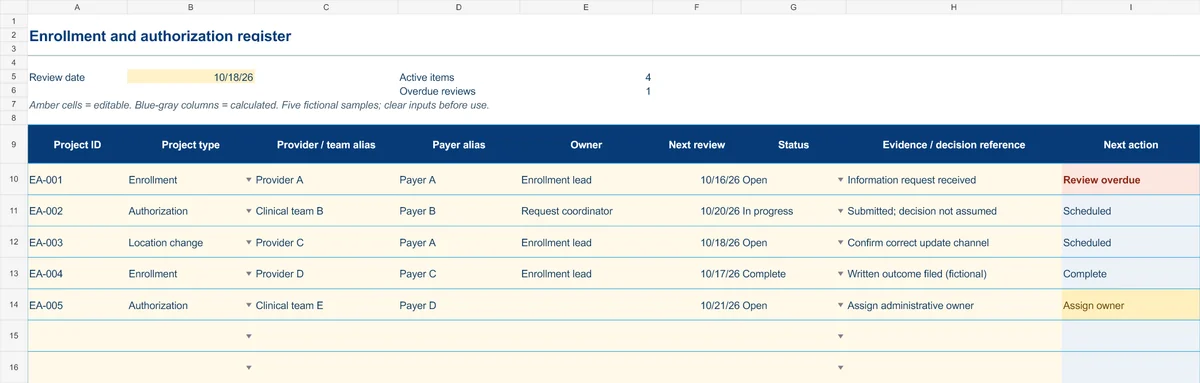
Start with the Instructions tab. Replace the five fictional samples, set your review date and keep the formula columns intact.
Free XLSX tool · No signup
Enrollment & authorization register
Track administrative projects from information gathering to a documented outcome.
- Project-type and status dropdowns
- Provider/team aliases and outcome references
- Calculated reminders for ownership and reviews
Use anonymous process tasks. Keep PHI in approved systems. Includes instructions and fictional samples; no macros or live data connection.