

Identify the Texas program project
Describe the provider or entity, location and program involved in the approved record. TMHP provides enrollment resources and PEMS support for Texas program work.
Review the applicable current instructions for the actual provider type and project rather than reusing a checklist from another state. Medicare and other payer updates remain separate routes with their own sources and decisions.
Control the source facts and approval
Name the practice owner who confirms the information and authorizes the change. Keep supporting credential documents in an approved secure repository.
A coordinator should be able to identify which fields are confirmed and which await an answer. Avoid letting a draft spreadsheet become the authoritative record when another approved source contains the actual current provider, entity or location information.

Move from the question to the next action
Track submission and response evidence
Preserve the project’s receipt, requests for additional information and written outcome as distinct milestones. Identify the source and applicable dates through the actual program process.
A submitted update is not proof that every participation or effective-date question is settled. When a response is incomplete or unclear, record the exact question and the authorized contact who can resolve it instead of closing the project prematurely.
Give billing a precise change handoff
Communicate the confirmed provider, entity, location and product scope to the relevant operational staff. Include the supporting reference and any outstanding limitation. Scheduling and billing need facts they can use, not a generic “updated” message.
If a separate plan question remains open, maintain that task and identify who monitors it. Keep the project’s conclusion limited to the evidence received.
Review future notices and remote coordination
Assign responsibility for later source notices and any related change projects. The free enrollment register can track aliases, owners, review dates and administrative outcome references without storing sensitive credential or patient data.
Houston practices can discuss their needs and systems with SBS in Jacksonville to confirm remote-service fit. This guide does not establish a Houston SBS office, Texas program approval or a payer participation relationship.
Illustrative workflow
A practical example.
Fictional Houston workflow: an organization prepares a location-related update using its approved source facts. The coordinator tracks the relevant Texas route and receives a request for clarification. That question goes to the practice approver, while billing is told the project remains unresolved. The eventual handoff names the confirmed outcome and scope instead of treating the initial receipt as a universal update.
Put it into practice
- Use the current Texas route for the actual project.
- Keep source facts and approvals controlled.
- Send operations the confirmed outcome and remaining questions.
Inside the workbook
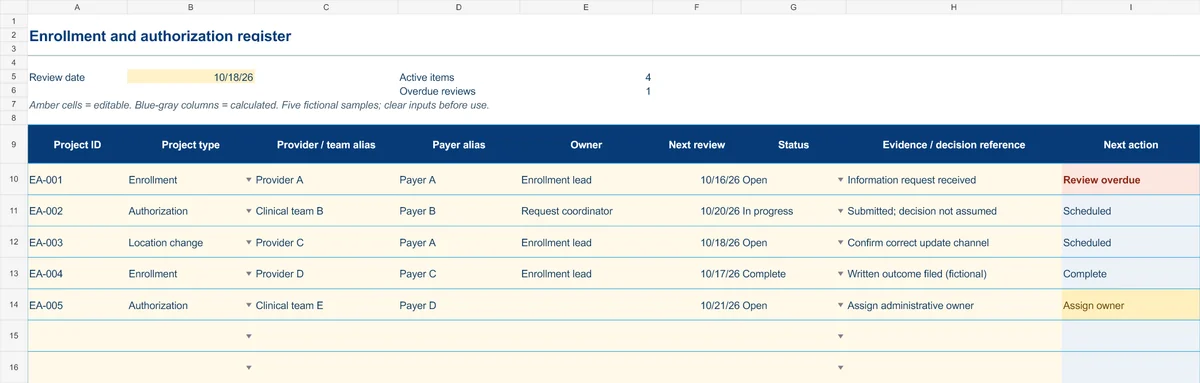
Start with the Instructions tab. Replace the five fictional samples, set your review date and keep the formula columns intact.
Free XLSX tool · No signup
Enrollment & authorization register
Track administrative projects from information gathering to a documented outcome.
- Project-type and status dropdowns
- Provider/team aliases and outcome references
- Calculated reminders for ownership and reviews
Use anonymous process tasks. Keep PHI in approved systems. Includes instructions and fictional samples; no macros or live data connection.