

Identify the decision and appeal pathway
Preserve the original determination and the actual instructions that apply to it. Establish the payer product, affected service and relevant dates in the approved system.
Do not transfer a deadline or form from another program merely because both processes are called appeals. CMS maintains a specific Original Medicare redetermination reference; other payer products and later review stages have their own applicable instructions.
Write the question the reviewer must answer
State what part of the determination is disputed and what evidence may address it. Distinguish an appeal position from a simple administrative correction or a request for clarification.
The person assembling the packet may not be the person authorized to approve clinical, coding or legal arguments. Identify those reviewers early so a collection of documents does not wait until the last moment for a decision about its purpose.

Move from the question to the next action
Build a traceable evidence index
Use the approved secure repository to list the relevant determination, submitted record and supporting material. Keep document dates, versions and source references clear.
Include what the applicable process requires and what supports the actual issue, rather than adding unrelated records to make the packet look substantial. Preserve the integrity of the clinical record; do not create or alter documentation to fit a preferred reimbursement outcome.
Check the submission requirements directly
Before submission, the authorized owner should verify the destination, format, signature or representation requirements and current source deadline. Record who performed that review.
Keep any outstanding question visible rather than marking the packet complete because documents have been gathered. A practice-chosen next review date in a tracker is a work-planning date, not a substitute for the applicable appeal deadline.
Retain receipt and monitor the response
Save the transmission or delivery evidence in the approved system and establish the next follow-up task. Receipt confirms one event; the determination may still be pending.
When the response arrives, compare it with the issue raised and route any further decision to the authorized reviewer. The denial and A/R template can coordinate anonymous tasks around this workflow, but it does not produce an appeal, calculate legal deadlines or guarantee a result.
Illustrative workflow
A practical example.
Fictional workflow: the team gathers supporting documents but has not confirmed which review process applies. The lead pauses the administrative completion status, obtains the appropriate route from the source determination and names the authorized reviewer. The packet index is then narrowed to the disputed issue, the submission checks are completed and receipt is retained. The tracker records the next review without treating receipt as a favorable outcome.
Put it into practice
- Use the original determination’s applicable instructions.
- Obtain the authorized appeal position and required approvals.
- Retain submission evidence and monitor the actual outcome.
Inside the workbook
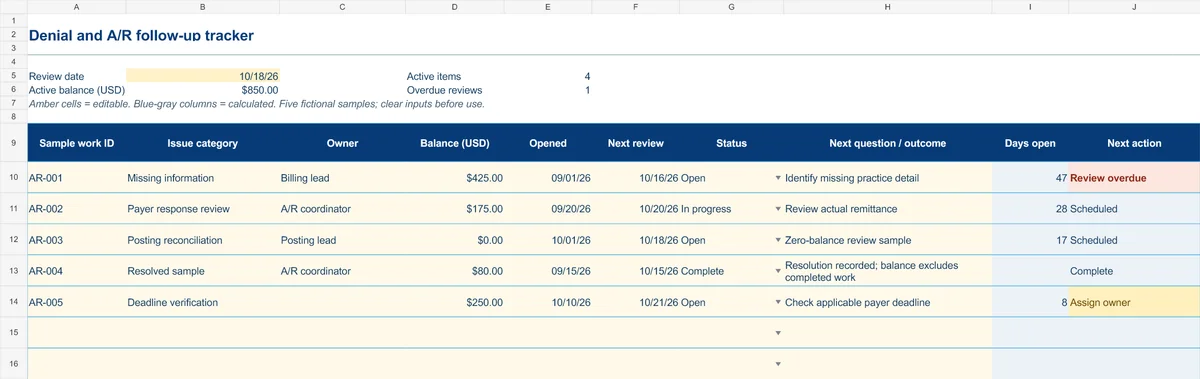
Start with the Instructions tab. Replace the five fictional samples, set your review date and keep the formula columns intact.
Free XLSX tool · No signup
Denial & A/R follow-up tracker
Plan anonymous follow-up work and make overdue reviews and missing owners visible.
- Fictional USD balances and active-balance summary
- Review dates chosen by your practice
- Calculated active items, age and next actions
Use anonymous process tasks. Keep PHI in approved systems. Includes instructions and fictional samples; no macros or live data connection.