

Fix the report definition first
Before assigning work, record the report date, included locations, payer filters and whether the balances are insurance, patient or combined. Confirm what starts the aging clock in your system.
Two reports may differ because one uses service date and another uses a different event. Keep the same definition when comparing reviews, and document any intentional change so an apparent improvement is not merely a different filter.
Read status alongside age and balance
A balance in an older bucket may have a pending response, an unresolved denial or an unapplied payment. Sample the underlying record to determine what the balance represents.
Group items by the decision needed as well as payer and age. This gives the team a practical next action and makes it easier to distinguish a collection task from a reconciliation question that belongs with payment posting.

Move from the question to the next action
Build a feasible weekly queue
Choose work based on known deadlines, available evidence, practice dependencies and the team’s actual capacity. Do not assume the largest amount is always the most actionable.
A smaller group with one shared missing detail may be ready for coordinated follow-up, while a large balance awaits an authorized decision. Record why a group is prioritized so the next reviewer understands the plan and can adjust it when circumstances change.
Make follow-up history reusable
Each note should explain the status checked, response obtained, action taken and next review. Preserve reference details in the approved account system rather than scattering them across personal spreadsheets.
A useful operational tracker can summarize anonymous work groups and owners without becoming another patient record. The free denial and A/R workbook uses fictional examples and review dates; it does not replace the detailed account history or set payer deadlines.
Explain changes in the total
At the next review, separate payment, adjustments, transfers and reporting changes where your source reports permit that analysis. A lower open balance alone does not establish that more cash was received.
Compare the same population, identify what remains unresolved and list practice decisions that still block progress. Remittance information is one source for understanding payment and adjustments; it should be reconciled to the relevant billing record rather than interpreted from an aging total alone.
Illustrative workflow
A practical example.
Fictional workflow: an older payer group contains both unresolved responses and balances awaiting posting review. The manager separates the groups, assigns the posting lead to reconcile payment references and gives the follow-up team the items with a defined payer question. The following week, the review distinguishes reconciled balances from newly paid items and preserves the original report filters for a fair comparison.
Put it into practice
- Save the report definition and review date.
- Group balances by the actual unresolved question.
- Explain balance changes alongside the remaining work.
Inside the workbook
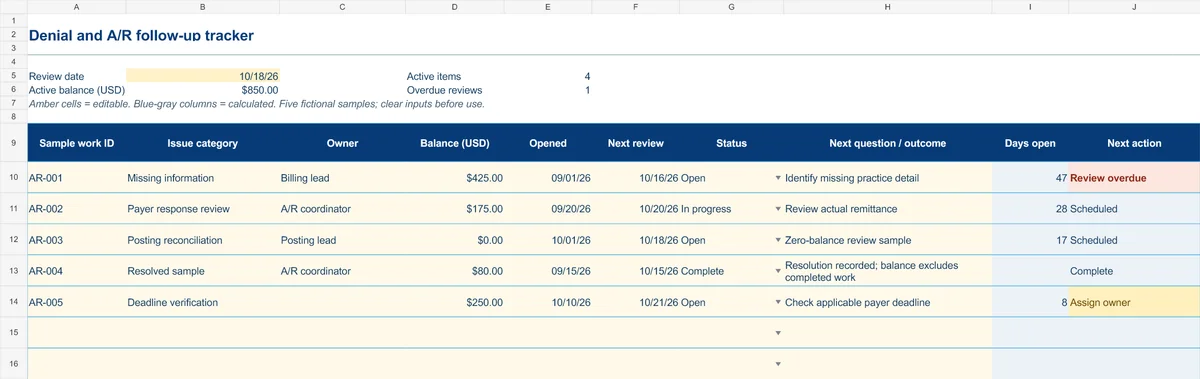
Start with the Instructions tab. Replace the five fictional samples, set your review date and keep the formula columns intact.
Free XLSX tool · No signup
Denial & A/R follow-up tracker
Plan anonymous follow-up work and make overdue reviews and missing owners visible.
- Fictional USD balances and active-balance summary
- Review dates chosen by your practice
- Calculated active items, age and next actions
Use anonymous process tasks. Keep PHI in approved systems. Includes instructions and fictional samples; no macros or live data connection.