

Locate the response in the claim journey
Identify whether the message came from the practice system, a clearinghouse or the payer, and preserve the actual acknowledgement or determination in the approved record. Internal labels vary, so a queue title alone is not enough.
The useful question is what the message confirms about receipt and processing, and what it says must happen next. Record the relevant version and date before making another transmission.
Read the error or adjustment in context
An administrative formatting issue, a missing data element and an adjudicated service question can all be described casually as a denial. Keep the underlying response available and identify the exact affected item.
CMS’s remittance reference concerns adjudication and adjustment information; it should not be treated as a description of every earlier transmission response. Use the appropriate current source for the actual stage and payer.

Move from the question to the next action
Choose a route supported by the evidence
A correction, a follow-up inquiry and an appeal are different actions. Confirm what the applicable process permits and who is authorized to decide. Do not submit a duplicate merely because the queue remains open or a general label looks familiar.
Preserve any source deadline and question that needs practice input. If the response is unclear, ask for clarification before making a change that may complicate the account history.
Keep ownership with the next decision
The person monitoring transmission may need an intake correction; another item may need qualified clinical or coding review. Route each question to the right owner with enough context to answer it.
A good task states the missing fact and supporting source, rather than forwarding an entire unexplained balance. Record the next review date and escalation path when the original recipient cannot resolve it.
Teach the stages in your own system
Use your actual software labels to create a concise team reference showing which source and owner apply at each stage. Test it with fictional examples before distributing it.
The denial and A/R workbook can track operational follow-up aliases, but it is not a claims engine and does not decide the proper submission route. Review recurring misrouting separately from the individual items so training addresses the real workflow.
Illustrative workflow
A practical example.
Fictional workflow: two items share an internal “denied” label. One source response asks for a missing administrative field before processing; the other contains an adjudicated adjustment. The lead splits the work, confirms each applicable process and assigns the correct reviewer. Neither item is resubmitted solely because of the shared label, and their histories retain the original responses.
Put it into practice
- Identify who issued the response and at what stage.
- Read the underlying message before choosing an action.
- Avoid duplicate submission without a supported route.
Inside the workbook
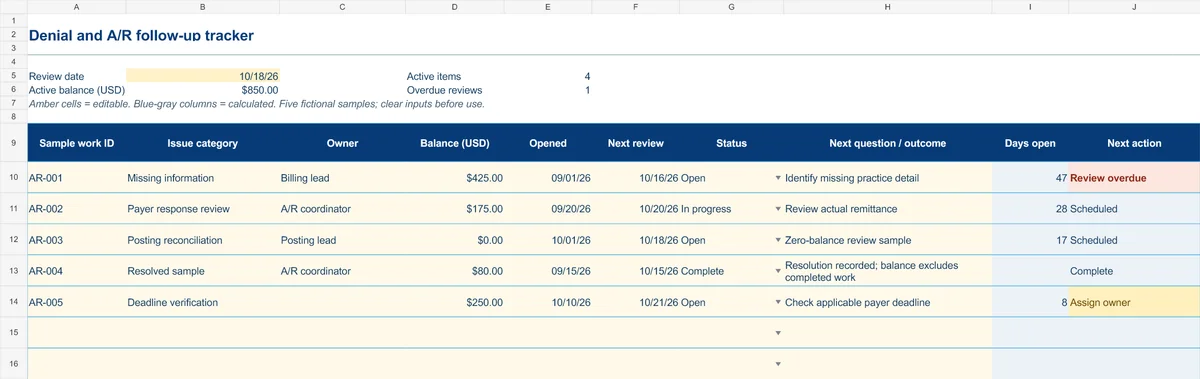
Start with the Instructions tab. Replace the five fictional samples, set your review date and keep the formula columns intact.
Free XLSX tool · No signup
Denial & A/R follow-up tracker
Plan anonymous follow-up work and make overdue reviews and missing owners visible.
- Fictional USD balances and active-balance summary
- Review dates chosen by your practice
- Calculated active items, age and next actions
Use anonymous process tasks. Keep PHI in approved systems. Includes instructions and fictional samples; no macros or live data connection.