

Define the service before designing the queue
Ask the clinical and billing leadership which care-management service and payer program the practice is considering. Similar program names can refer to different requirements.
An administrative team should not create an eligibility checklist from a marketing summary or assume that all patients with ongoing conditions fit the same service. Start from current program guidance and the practice’s approved care model.
Keep clinical responsibility explicit
Identify the appropriately qualified team responsible for assessment, care planning, clinical communications and treatment decisions. Administrative support can organize approved tasks, route questions and keep records available, but a task log does not turn coordination work into billable care. The practice should define urgent and clinical escalation routes before outreach or scheduling support begins, so staff know when an administrative conversation must be handed over.

Move from the question to the next action
Map documentation and billing review
Agree how the people reviewing billing receive the relevant program records and how they ask for clarification. Record what remains unanswered and who can resolve it.
Do not select codes, time thresholds or payment assumptions from this operational guide. CMS maintains CCM resources within its care-management guidance; the applicable current service requirements and payer rules need direct review by the practice’s qualified decision makers.
Scope access and communication
List the administrative activities to delegate, the approved systems and the minimum access needed for the agreed work. Decide who approves access and how it is removed or revised when responsibilities change.
Keep public contact inquiries limited to business needs. Before any patient-level work starts, the practice and support partner should agree on the appropriate arrangements and secure record-handling process for the actual scope.
Test one complete administrative cycle
Walk through a fictional task from assignment to clinical escalation, documentation handoff and billing review. Look for a step with no owner or no approved communication route.
The internal medicine tracker can record program-readiness tasks using aliases; it is not a CCM clinical record or time-based billing tool. Close readiness tasks only when the evidence for that administrative milestone is recorded, and preserve remaining clinical or payer questions.
Illustrative workflow
A practical example.
Fictional workflow: a practice wants support organizing program follow-up. The coordinator logs an administrative task and discovers that staff do not know where to send a clinical question. Clinical leadership defines the escalation route before the workflow is used. Billing leadership separately reviews the service documentation process. Completion of the readiness checklist is not treated as approval to bill for any particular patient or activity.
Put it into practice
- Identify the actual service and payer program.
- Name clinical, administrative and billing decision owners.
- Test escalation and documentation handoffs before launch.
Inside the workbook
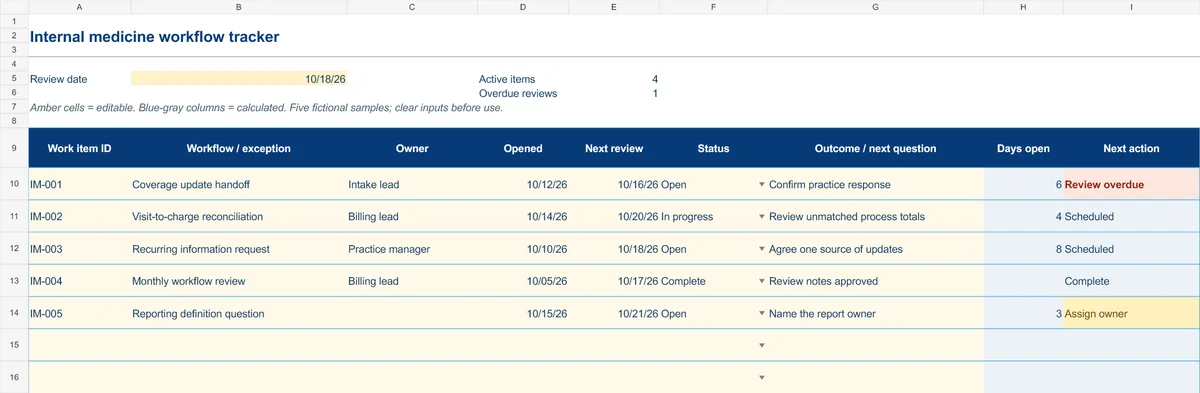
Start with the Instructions tab. Replace the five fictional samples, set your review date and keep the formula columns intact.
Free XLSX tool · No signup
Internal medicine workflow tracker
Coordinate recurring administrative exceptions, responsibilities and follow-up.
- 50 prepared operational work-item rows
- Opened date, next review and outcome notes
- Calculated days open and next actions
Use anonymous process tasks. Keep PHI in approved systems. Includes instructions and fictional samples; no macros or live data connection.