

Set the review period and record source
Define the period being reviewed and the approved program record that supplies the evidence. The person organizing the review should understand what the source contains and where the clinical team records its work.
Avoid combining informal outreach lists with service documentation as if they were equivalent. If a source is incomplete, identify the missing record rather than filling the gap with an administrative assumption.
Group questions by who can answer them
Separate missing administrative information, a clinical clarification and a billing-rule question. Each belongs with a different responsible reviewer.
A coordinator can track that a response is outstanding without deciding what care was provided or whether the service is reportable. Specific questions reduce repeat work: name the document or decision needed and where the reviewer should record the authorized response.

Move from the question to the next action
Preserve the actual activity record
Do not reconstruct clinical activity from a scheduling calendar or a coordinator’s memory. Keep the underlying record and any approved clarification in the practice’s designated system.
A monthly summary should make the source easy to find, not become an alternate record with conflicting details. If information changes after review, ensure the people responsible for the billing decision receive the update through the agreed process.
Use current program guidance for the determination
CMS’s care-management page links to CCM service and FAQ resources. Consult the current applicable material directly when the practice evaluates Medicare requirements, and check other payers separately.
This article does not establish qualifying conditions, consent, time, staffing or code selection. Those questions require the actual service framework and appropriately qualified review; an administrative status of “complete” is only evidence that a defined work task was closed.
Report unresolved dependencies after review
At closeout, list the outstanding question, owner and next review date. Keep a record of what was reviewed and any authorized outcome without copying patient detail into a public spreadsheet.
The internal medicine tracker can assign anonymous process tasks such as revising an information handoff. A recurring missing record may warrant a process discussion, but it does not justify backfilling documentation or assuming that every service in the period was ready for billing.
Illustrative workflow
A practical example.
Fictional workflow: the monthly organizer finds that one source record is unavailable and another item needs clinical clarification. Those questions are assigned separately, with the billing decision held for the appropriate reviewer. The manager also logs a process task to improve access to the correct source. When the task closes, its outcome describes the access improvement rather than claiming that every program record meets billing requirements.
Put it into practice
- Name the period and authoritative program record.
- Separate administrative, clinical and billing questions.
- Keep service determinations with qualified reviewers.
Inside the workbook
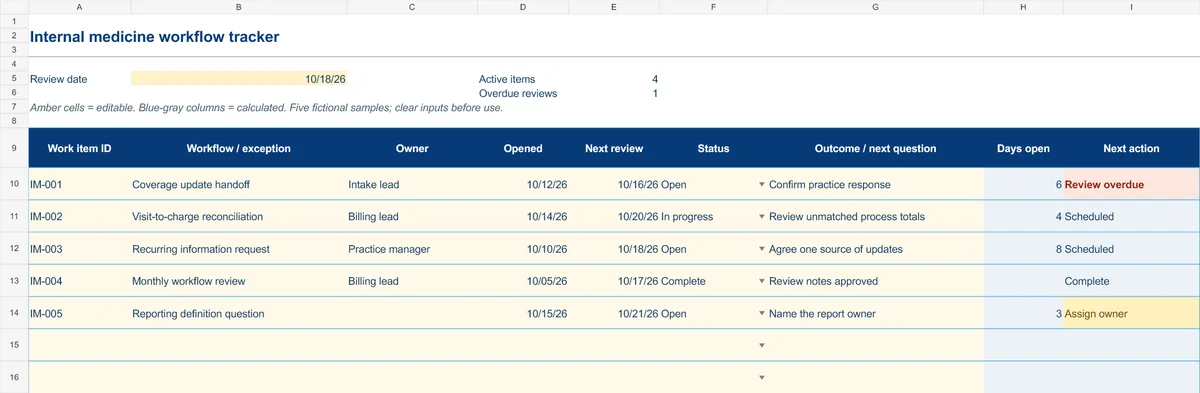
Start with the Instructions tab. Replace the five fictional samples, set your review date and keep the formula columns intact.
Free XLSX tool · No signup
Internal medicine workflow tracker
Coordinate recurring administrative exceptions, responsibilities and follow-up.
- 50 prepared operational work-item rows
- Opened date, next review and outcome notes
- Calculated days open and next actions
Use anonymous process tasks. Keep PHI in approved systems. Includes instructions and fictional samples; no macros or live data connection.