

Map the recurring visit handoff
Start with how a visit becomes ready for the billing team’s review. Identify the source record, completion signal and contact for missing information.
Ongoing patient relationships do not mean every visit has the same services or coverage details. Build the process around what actually occurred, and keep changes to provider or location information visible when they affect the administrative record.
Separate record readiness from coding decisions
A coordinator can check whether the required handoff has occurred and whether a question has an owner. The clinician and appropriately qualified coding reviewer determine how documented services support billing.
Avoid using a workflow status to imply that documentation meets every payer requirement. CMS maintains Medicare E/M material for relevant review, while the actual payer, service date and current guidance determine the reference that should be applied.

Move from the question to the next action
Make the payer response return to a useful queue
After submission, the next task depends on the response. An administrative rejection, an adjudicated adjustment and a payment-posting question can require different actions.
Preserve the actual response in the approved system and identify the question that remains. The practice should receive a specific request when its input is needed, rather than a broad list of balances with no explanation of what would move them forward.
Use an exception tracker for operational ownership
The free internal medicine workbook records one operational work item per row: workflow, owner, opened date, next review, status and outcome. Days open and next action are calculated from the review date and entered fields.
It is designed for aliases and process questions, not a parallel patient ledger. Keeping that boundary makes the tracker easier to review and avoids scattering sensitive clinical or claim information across local copies.
Close the review with a practice decision
At a recurring meeting, distinguish completed actions from dependencies and recurring patterns. A resolved work item may suggest a training topic or handoff change, but one case does not establish a practice-wide cause.
Agree on the evidence for a process change, its owner and the later sample that will be reviewed. Keep individual claim decisions in the appropriate system and use the meeting to maintain clear operational responsibilities.
Illustrative workflow
A practical example.
Fictional workflow: the billing team repeatedly asks how updated visit information reaches it. The practice manager maps the existing handoff and identifies two informal channels. The team agrees on one approved route, names a response owner and logs the process change in the tracker. A later sample checks whether the new route is used; patient-level questions remain in the practice’s authorized records.
Put it into practice
- Define the visit-readiness signal and source record.
- Route specific questions to authorized reviewers.
- Track process exceptions separately from patient records.
Inside the workbook
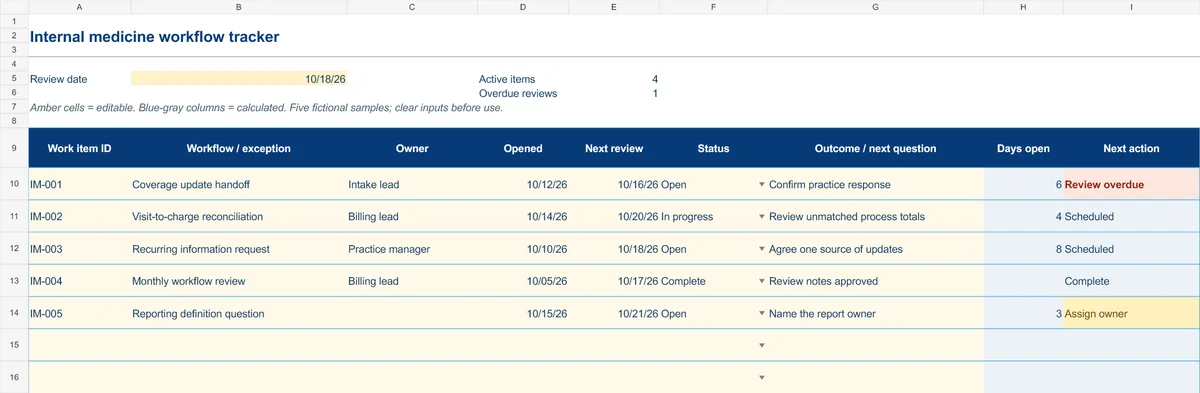
Start with the Instructions tab. Replace the five fictional samples, set your review date and keep the formula columns intact.
Free XLSX tool · No signup
Internal medicine workflow tracker
Coordinate recurring administrative exceptions, responsibilities and follow-up.
- 50 prepared operational work-item rows
- Opened date, next review and outcome notes
- Calculated days open and next actions
Use anonymous process tasks. Keep PHI in approved systems. Includes instructions and fictional samples; no macros or live data connection.