

Define the provider, entity and payer scope
Write down the individuals, organizations, service locations and payer products involved before gathering documents. A new clinician, a new location and an ownership change are different projects.
Identify which facts already exist and which need confirmation by the practice. Keep the project description specific enough that a coordinator can recognize an out-of-scope request rather than adding it to an application without review.
Choose an authoritative information owner
Use one approved source for current practice and provider details. The person assembling an application should know who confirms accuracy and who can sign or approve it.
Track requests for missing information with an owner and date, and avoid keeping credential files in an unrestricted public download or personal mailbox. The free register is designed for aliases and administrative milestones, not sensitive credential documents or patient information.

Move from the question to the next action
Separate stages that mean different things
Information collection, submission, payer follow-up and written outcome are distinct stages. An acknowledgement is evidence that a request was received; it is not evidence of network participation or an effective date.
Preserve the actual payer communication and outstanding questions. A project can be administratively active even when there is nothing more to submit that day, because someone still needs to confirm what the response means for the practice.
Communicate confirmed facts to operations
Create a closeout handoff naming the payer product, relevant provider and location, confirmed outcome, supporting reference and any unresolved limitation. Scheduling and billing should receive the facts they need through the agreed secure process. Avoid a vague message such as “credentialing is done.” It may hide a separate contracting, enrollment or effective-date question that the practice must resolve before making operational assumptions.
Keep changes and future reviews visible
After closeout, retain the supporting references and identify who monitors future notices or changes. Update the practice’s information source when an approved change occurs, and assess which payer records also need attention.
CMS maintains Medicare enrollment guidance and PECOS information; other payer programs have their own processes. The practical discipline is consistent tracking, while the actual requirements come from the applicable program and current correspondence.
Illustrative workflow
A practical example.
Fictional workflow: a new provider joins one existing location. The coordinator creates a project for the relevant payer product, records outstanding practice approvals and saves the submission reference. A later response resolves one stage but leaves an effective-date question open. The closeout message identifies that unanswered question explicitly, so scheduling and billing receive an accurate status rather than assuming all participation details are settled.
Put it into practice
- Define the provider, entity, location and payer product.
- Distinguish receipt, outcome and effective-date evidence.
- Send a documented closeout handoff to scheduling and billing.
Inside the workbook
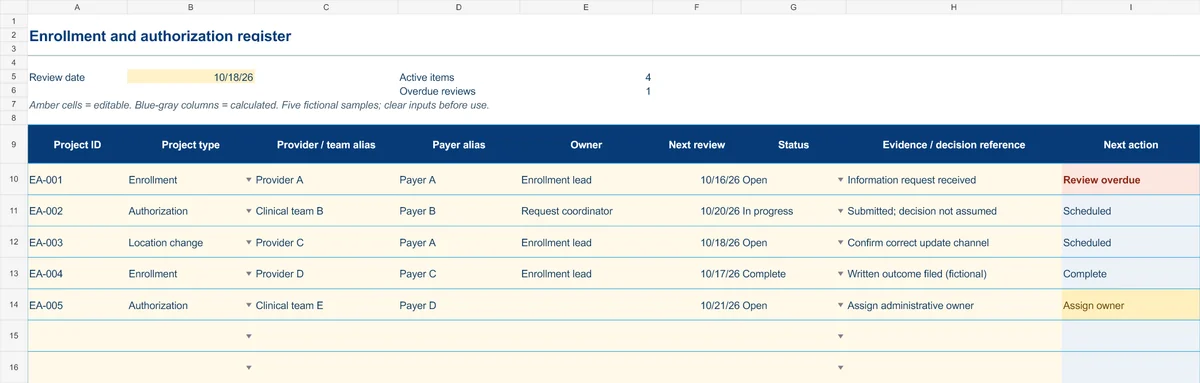
Start with the Instructions tab. Replace the five fictional samples, set your review date and keep the formula columns intact.
Free XLSX tool · No signup
Enrollment & authorization register
Track administrative projects from information gathering to a documented outcome.
- Project-type and status dropdowns
- Provider/team aliases and outcome references
- Calculated reminders for ownership and reviews
Use anonymous process tasks. Keep PHI in approved systems. Includes instructions and fictional samples; no macros or live data connection.