

Start from the original announcement
Preserve the official payer or agency source, its publication or update date and the effective information relevant to the practice. Distinguish a proposal from a final requirement and an operational process from a technical implementation.
CMS’s interoperability and prior authorization rule materials describe a defined set of policies and affected payers. An article headline alone cannot establish that a particular service or product falls within that scope.
Build a product and workflow applicability map
List the actual payer products and authorization workflows used by the practice. Identify who confirms applicability and which questions remain open.
Do not assume a requirement affecting one program automatically applies to commercial products, drug requests or every service category. The map should make uncertainty visible and link each decision to the current official source or payer communication used by the authorized reviewer.

Move from the question to the next action
Translate confirmed changes into tasks
Once scope is confirmed, identify what staff will do differently: capture another response field, route a new notice, update an escalation contact or use a revised channel. Assign an owner and review date to each change. If a technology change is involved, confirm the practice’s actual vendor capability and implementation plan rather than promising an integration from a general description of the rule.
Test exceptions as well as the normal route
Use fictional examples to walk through a request that needs more information, a decision that does not answer the original question and a channel that is unavailable. Confirm the administrative and clinical escalation paths.
A successful test submission or receipt is not proof that every request will be approved or that the workflow satisfies every applicable requirement. Record the unresolved issue and the person who can make the next decision.
Keep the change record alive
Store the approved procedure, source reference, owner and review date together. Retire obsolete instructions through the practice’s normal document-control process so staff do not choose between conflicting versions. The free register can coordinate anonymous readiness tasks, while request records remain in approved systems.
Review later notices for applicability instead of assuming a process will remain unchanged indefinitely. No universal turnaround promise is made by this guide.
Illustrative workflow
A practical example.
Fictional workflow: a team sees an announcement and proposes changing every authorization queue. The manager first maps the relevant products and separates a confirmed process change from an unanswered technology question. Staff test the revised handoff with fictional requests. Only the applicable procedure is updated, and the unresolved vendor question remains assigned rather than being presented as a completed integration.
Put it into practice
- Check the original source and actual applicability.
- Separate operational and technology changes.
- Test exceptions and retain unresolved questions.
Inside the workbook
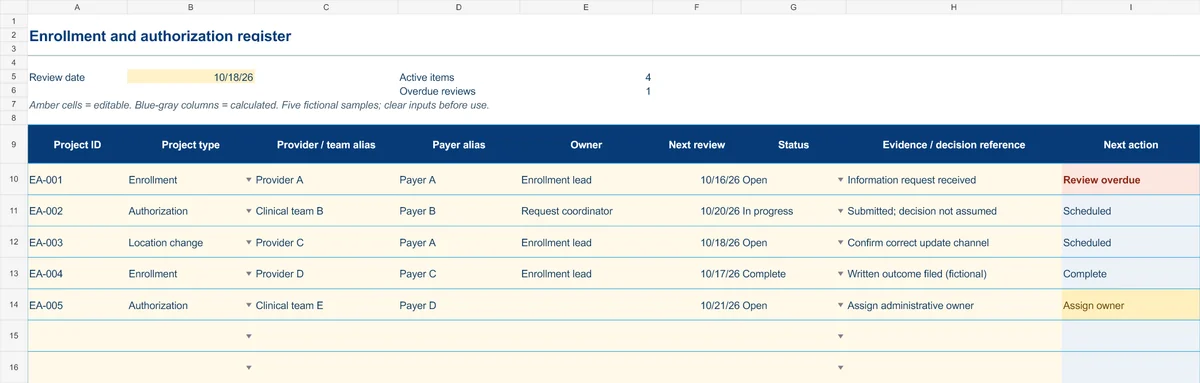
Start with the Instructions tab. Replace the five fictional samples, set your review date and keep the formula columns intact.
Free XLSX tool · No signup
Enrollment & authorization register
Track administrative projects from information gathering to a documented outcome.
- Project-type and status dropdowns
- Provider/team aliases and outcome references
- Calculated reminders for ownership and reviews
Use anonymous process tasks. Keep PHI in approved systems. Includes instructions and fictional samples; no macros or live data connection.