

Describe the change as a project
Identify the clinician or entity, location, payer products and intended operational timing in the approved records. A new address, added practice site and ownership change can require different review.
State what is known and who confirms the remaining facts. A clear project scope helps prevent a coordinator from treating a related request as part of an existing approval without checking its actual requirements.
Reconcile the practice information source
Confirm that the people preparing updates use the same approved provider, entity and location facts. Identify who is authorized to approve changes and supply supporting documents.
Keep sensitive credential information in the appropriate secure repository. An operational spreadsheet can use provider aliases and milestone references, but it should not hold personal identifiers, credential files or patient records copied from the enrollment process.

Move from the question to the next action
Track each applicable payer route
CMS provides Medicare enrollment and PECOS guidance; other programs use their own update processes. Build a route for each actual payer product rather than assuming one central submission covers all relationships.
Keep submission evidence, follow-up questions and confirmed outcomes separate. When a response is ambiguous, assign the interpretation question to the appropriate practice or payer contact and preserve it until answered.
Prepare the operational handoff
Scheduling and billing need the confirmed facts that affect their work, including any relevant outcome or effective-date information and unresolved question. Avoid announcing a broad “all set” status when only one application or update has been received.
Give the recipient a clear source reference and contact for clarification. If the outcome applies only to one provider, location or product, make that limit explicit.
Close the project without losing future tasks
Record what changed, what evidence supports it and what remains open for later review. Identify who monitors subsequent notices and future required updates through the applicable program process.
The enrollment and authorization register can track these administrative milestones with aliases. A completed row represents the defined task outcome, not an independent determination that the provider may bill every service or that reimbursement will follow.
Illustrative workflow
A practical example.
Fictional workflow: a practice adds a location and submits one update. The project review identifies that another payer product has a separate unresolved process. The coordinator records the first outcome, keeps the second route active and gives billing a precise handoff by product and location. The practice avoids treating one receipt as universal confirmation of all participation details.
Put it into practice
- Define the exact provider, entity and location change.
- Track each applicable payer route separately.
- Communicate confirmed outcomes and limits to operations.
Inside the workbook
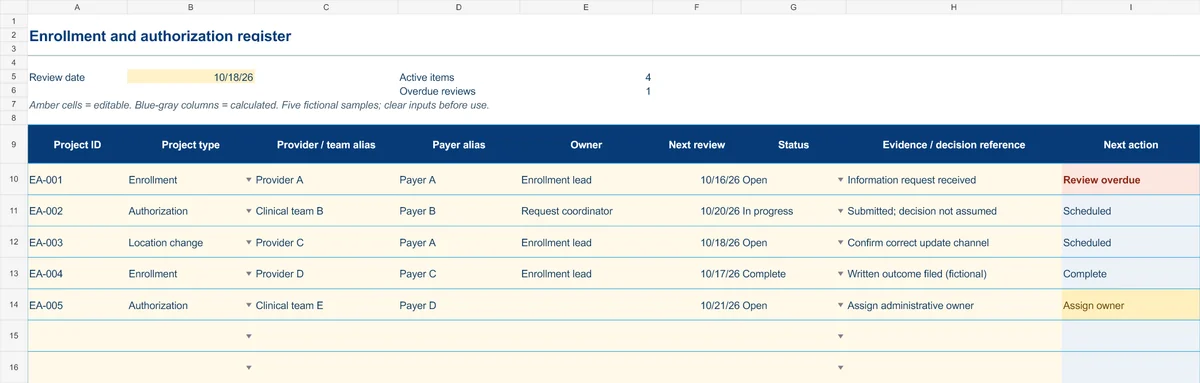
Start with the Instructions tab. Replace the five fictional samples, set your review date and keep the formula columns intact.
Free XLSX tool · No signup
Enrollment & authorization register
Track administrative projects from information gathering to a documented outcome.
- Project-type and status dropdowns
- Provider/team aliases and outcome references
- Calculated reminders for ownership and reviews
Use anonymous process tasks. Keep PHI in approved systems. Includes instructions and fictional samples; no macros or live data connection.