

Define one administrative task per row
Decide whether the register tracks a request project, a missing-information handoff or a process improvement. Do not mix these units without clear labels.
The free template uses aliases for administrative coordination, not patient authorization records. Keep the detailed request, clinical information and payer correspondence in approved systems and use the register to identify the work and responsible team.
Use states that reflect evidence
Information gathering, submission, a payer question and a written decision are distinct events. Record the status supported by the actual source, not the status the team hopes will follow. A receipt does not establish approval.
When a decision arrives, the appropriate reviewer may still need to interpret the scope and conditions for the planned workflow. Preserve that question rather than collapsing every outcome into “done.”

Move from the question to the next action
Make the next question explicit
An item waiting on clinical information needs a clinical reviewer; an administrative field may belong with intake or practice management. Identify the specific missing fact and approved recipient.
The coordinator can route and monitor the task without making a clinical determination or promising coverage. Keep the next review date separate from any payer or clinical deadline, which must be verified through the applicable source and practice process.
Communicate a meaningful scheduling status
Agree what scheduling needs to know and which person answers unresolved questions. Send the actual evidenced state and remaining dependency through the approved process.
Do not let a spreadsheet color decide whether care proceeds or how urgent a patient’s need is. Clinical decisions and escalation follow the practice’s designated clinical process, while the register supports the administrative handoff around it.
Use completion checks carefully
The downloadable enrollment and authorization workbook asks for an owner and review date on open items and an outcome reference on completed items. Those formulas identify missing administrative prerequisites; they do not validate an authorization or payer requirement.
CMS’s prior authorization rule resources have a defined scope that should be reviewed directly when relevant. At regular reviews, identify repeated handoff failures and improve the process without assuming a universal payer rule.
Illustrative workflow
A practical example.
Fictional workflow: three “pending” tasks actually mean information gathering, payer review and a returned clinical question. The coordinator separates the states and assigns the appropriate next owner to each. Scheduling receives the relevant status, and a clinician handles the clinical question. The workbook remains a PHI-free operational view while the actual request and decision records stay in the practice’s approved systems.
Put it into practice
- Define the unit tracked and use anonymous aliases.
- Separate receipt, information requests and decisions.
- Track the next action without making a coverage determination.
Inside the workbook
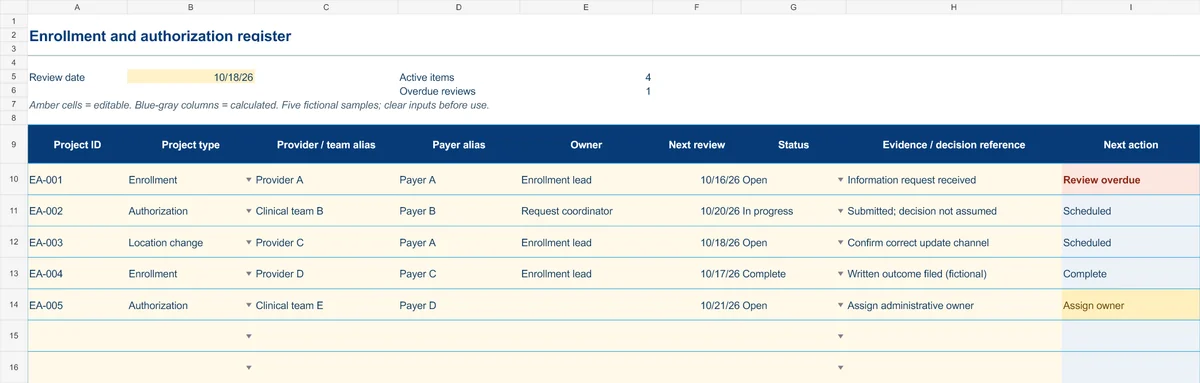
Start with the Instructions tab. Replace the five fictional samples, set your review date and keep the formula columns intact.
Free XLSX tool · No signup
Enrollment & authorization register
Track administrative projects from information gathering to a documented outcome.
- Project-type and status dropdowns
- Provider/team aliases and outcome references
- Calculated reminders for ownership and reviews
Use anonymous process tasks. Keep PHI in approved systems. Includes instructions and fictional samples; no macros or live data connection.