

Choose the operational unit of work
Use one row for one process exception or administrative task. Examples include an unresolved coverage-update handoff, a report-definition question or a recurring information-request route.
Detailed patient and claim work belongs in approved practice systems. The workbook uses fictional aliases and is designed to coordinate the process around that work, not to become a second medical record or a claim-status database with identifying information.
Prepare the workbook before using it
Save a working copy, read the Instructions tab and replace the five sample input rows. Set the editable review date to your actual review. Keep the calculated columns intact.
The tracker provides 50 prepared rows; if you extend it later, update the formulas and bounded summary ranges consistently. The file contains no macros, external data connections or automatic submission to SBS.

Move from the question to the next action
Enter the owner, dates and status
Name the person responsible for the next administrative action, the date opened and the next review. Use the note field for the unanswered question or outcome.
A status such as Waiting still needs an owner and a planned review. Keep the next review distinct from any payer deadline or clinical escalation requirement, which must come from the actual source and approved practice process.
Understand the calculated fields
Days open uses the workbook’s review date and opened date for active work, while completed items stop displaying an active age. Missing or inconsistent dates remain visible rather than being presented as plausible zero-day work. Next action identifies missing ownership, missing review dates and overdue reviews.
A completed item still needs an outcome note. These checks support administrative organization; they do not validate clinical documentation or establish billable services.
Turn repeated exceptions into a review topic
Use the recurring work to identify one handoff worth improving, then assign the process change and a later review. Keep the observed issue separate from an untested cause.
Qualified clinical and coding reviewers retain the actual visit and billing decisions. If you discuss support with SBS, describe the workflow and business need first and agree an appropriate secure process before exchanging any patient or claim information.
Illustrative workflow
A practical example.
Fictional walkthrough: an open work item has an opened date six days before the reference review date, so Days open shows six. Assigning a missing owner changes the next-action result. If a completed item’s outcome note is cleared, the completion reminder returns. The fictional zero-balance and missing-date concepts in the companion tools likewise distinguish real values from absent prerequisites rather than hiding them as success.
Put it into practice
- Use one anonymous operational work item per row.
- Set review dates and preserve calculated columns.
- Keep the outcome note and qualified decision boundaries clear.
Inside the workbook
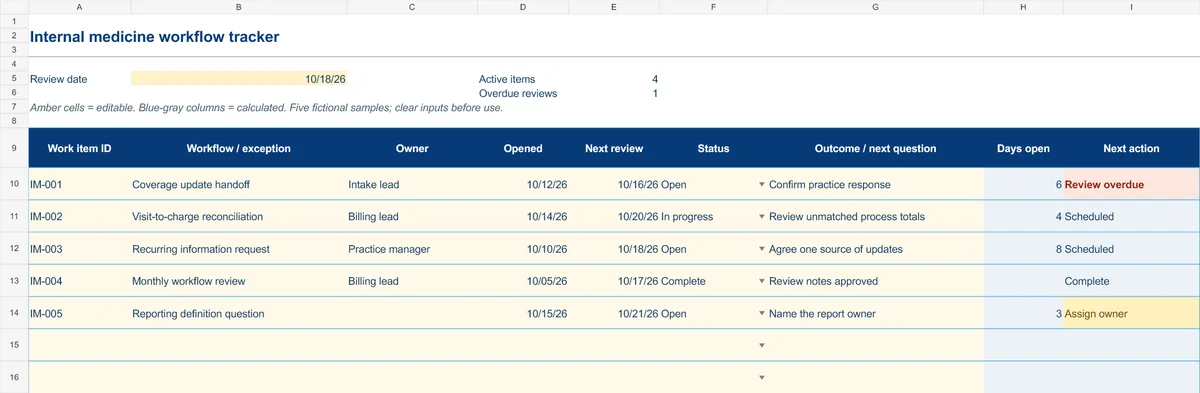
Start with the Instructions tab. Replace the five fictional samples, set your review date and keep the formula columns intact.
Free XLSX tool · No signup
Internal medicine workflow tracker
Coordinate recurring administrative exceptions, responsibilities and follow-up.
- 50 prepared operational work-item rows
- Opened date, next review and outcome notes
- Calculated days open and next actions
Use anonymous process tasks. Keep PHI in approved systems. Includes instructions and fictional samples; no macros or live data connection.