

Start with a clean working copy
Download the XLSX workbook and save a practice-controlled copy. Read the Instructions tab before replacing the five fictional sample rows. The tracker has 50 prepared rows for operational checks.
Keep its formula columns intact and use process or project aliases only. Do not enter patient names, account identifiers, diagnoses or claim details. This template is not a secure clinical system or a billing engine.
Define a task staff can complete
Use one row for one administrative check such as confirming the intake-update route or reviewing an encounter-reconciliation handoff. Name the owner, review due date and current status.
Describe the evidence of completion in the note field without copying sensitive records. A broad entry such as “fix billing” does not tell the next reviewer which action is expected or who can make the required decision.

Move from the question to the next action
Set the review date and read next action
The editable review date is the reference for overdue work. An open item without an owner asks you to assign one; a missing review date stays visible; an earlier review date produces an overdue reminder.
These are administrative work-planning checks, not payer deadline calculations or clinical urgency rules. Use the actual source notice and practice process for any applicable deadline or care decision.
Close a task with evidence
Selecting Complete is not enough for the template’s completion reminder: the evidence note must also be populated. The note should describe the defined process outcome, such as an approved handoff route or a recorded review.
It does not certify a claim, establish eligibility or determine the correct E/M service. Qualified reviewers use the actual records and applicable payer guidance for those decisions.
Use the review to improve the process
At a daily or weekly check, review overdue items and tasks missing an owner, then record the next specific action. Keep repeated questions connected to a practical process improvement. If you extend beyond the 50 prepared rows, extend both formulas and summary ranges consistently and verify the result.
The workbook has no macros or live connections; it does not send data to SBS. Use the public inquiry only to describe business needs.
Illustrative workflow
A practical example.
Fictional walkthrough: the sample intake handoff is open with a review date before the workbook’s reference date, so it shows Review overdue. A different sample has no owner and shows Assign owner. After you enter an owner, its next action changes based on the date. A completed task with no evidence note remains flagged for that note, keeping the administrative prerequisite visible.
Put it into practice
- Replace samples and use nonpatient process IDs.
- Set the review date and preserve formula columns.
- Record evidence before treating a task as complete.
Inside the workbook
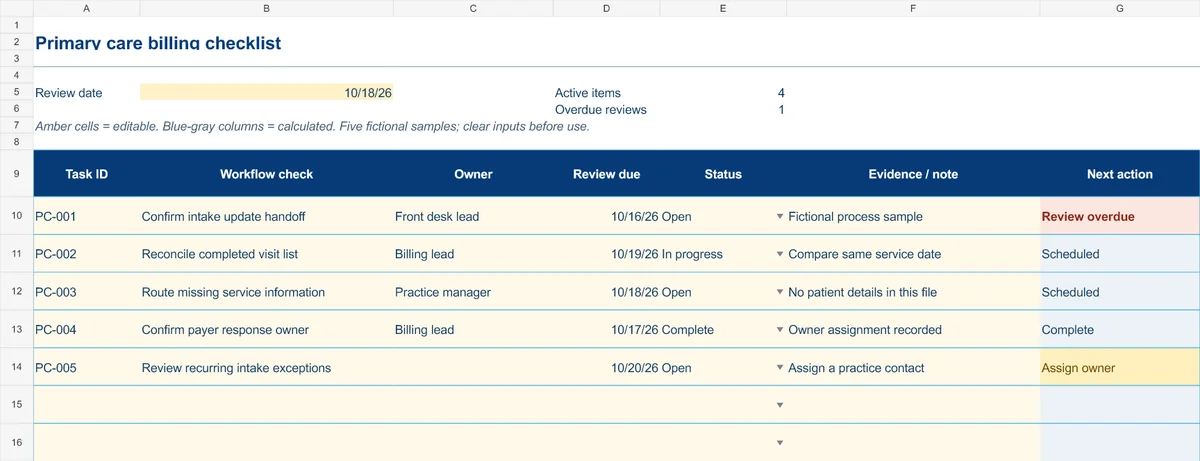
Start with the Instructions tab. Replace the five fictional samples, set your review date and keep the formula columns intact.
Free XLSX tool · No signup
Primary care billing checklist
Daily process checks across intake, encounter reconciliation and payer follow-up.
- 50 prepared task rows and five fictional examples
- Owner, review date, status and evidence notes
- Calculated next-action reminders
Use anonymous process tasks. Keep PHI in approved systems. Includes instructions and fictional samples; no macros or live data connection.