

Define the service workflow in scope
Start with the actual planned service, payer product and practice process in the approved records. Identify which team confirms the applicable request requirements.
Similar service descriptions can hide different settings or arrangements, so avoid carrying a prior authorization assumption into a new case without review. The coordinator needs a defined administrative task and a clear source for the facts used to prepare it.
Build a complete administrative request handoff
Agree who supplies practice information, who provides clinical support and who approves the submission. Keep missing fields and documents visible before the task is passed along.
When the payer requests more information, preserve the exact question and route it to the appropriate reviewer. A coordinator can organize the response but should not compose a clinical justification or alter a record to fit a desired determination.

Move from the question to the next action
Keep receipt, pending review and decision separate
Use statuses that reflect the evidence actually available. A portal acknowledgement confirms a stage of transmission, while a written decision may require interpretation of its scope and conditions.
Preserve the reference in the approved system and communicate the precise status to scheduling. Authorization does not establish every condition for payment, so billing still needs the relevant documentation and payer review for the service actually performed.
Define the escalation route before it is needed
Name the administrative contact for an unanswered payer question and the clinical contact for patient-care concerns. A calendar or workbook overdue flag should never determine urgency of care.
The team should know what to do if the current process cannot resolve a scheduling dependency. Review applicable payer instructions and the practice’s approved procedures rather than applying one universal turnaround or escalation rule.
Close the task with the decision evidence
The free enrollment and authorization register can track aliases, project type, owner, next review and an outcome reference. Its completion check asks for evidence of the administrative outcome; it does not establish authorization validity or clinical appropriateness.
At closeout, identify any remaining question for scheduling or billing. Repeated unclear handoffs should lead to a process improvement, with a later check that the revised status reaches the correct team.
Illustrative workflow
A practical example.
Fictional workflow: an authorization task is marked submitted, but scheduling asks whether the request has a decision. The coordinator checks the source, confirms that a clinical question remains open and routes it to the designated reviewer. Scheduling receives that accurate status and an escalation contact. The register remains active until the defined administrative outcome is documented, rather than closing at receipt.
Put it into practice
- Name the actual request and clinical-information owners.
- Communicate the evidenced status to scheduling.
- Retain the decision reference and remaining conditions.
Inside the workbook
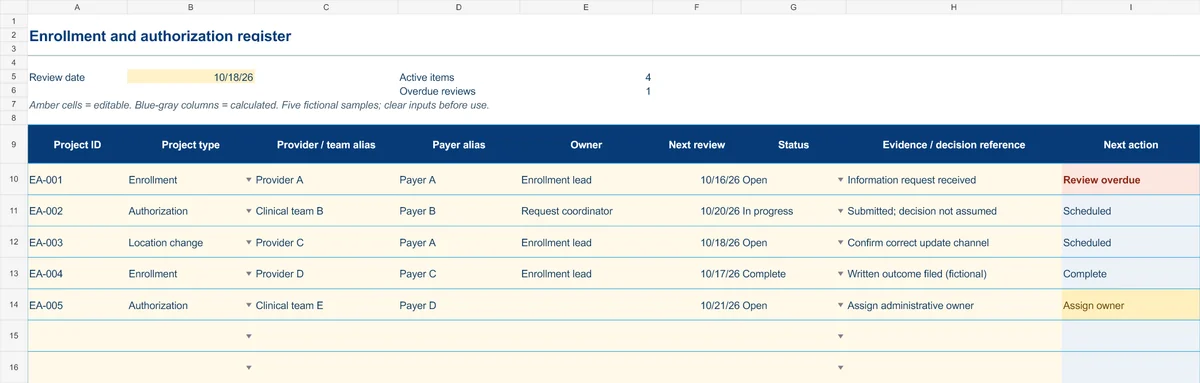
Start with the Instructions tab. Replace the five fictional samples, set your review date and keep the formula columns intact.
Free XLSX tool · No signup
Enrollment & authorization register
Track administrative projects from information gathering to a documented outcome.
- Project-type and status dropdowns
- Provider/team aliases and outcome references
- Calculated reminders for ownership and reviews
Use anonymous process tasks. Keep PHI in approved systems. Includes instructions and fictional samples; no macros or live data connection.