

Define the reconciliation population
State the payer, deposit or batch reference and the period being compared. Confirm whether the source includes reversals, adjustments or items from other periods.
A deposit total and a billing activity report may represent different populations. Preserve the source filters and run dates before investigating, so the team can reproduce the difference and avoid treating a report-definition mismatch as a missing payment.
Trace the source to the posted record
Use the full relevant remittance and approved posting system to identify how each amount was applied. Keep payment, adjustment and other reconciliation questions distinct.
A balance change does not necessarily represent cash, and a deposit difference may not belong to an individual account. CMS’s Medicare remittance guidance describes different adjustment levels; use the applicable actual response rather than assigning a difference from a summary alone.

Move from the question to the next action
Assign differences by the decision needed
Separate a missing batch, an unapplied amount, a duplicate posting question and an unresolved payer explanation where those categories fit the evidence. Name the owner who can research each one. Do not ask a follow-up specialist to resolve a banking or accounting issue without the relevant reference, and do not ask the posting team to decide a clinical or coding dispute that requires another reviewer.
Preserve authorized corrections
When the investigation identifies a change, follow the practice’s approval process and keep enough history to explain it. Record the source, action and outcome in the designated system.
Avoid netting unrelated differences together to produce an apparently balanced total. If the available evidence cannot explain the difference, keep the unresolved amount and question visible rather than making an unsupported adjustment.
Close the review with a clear bridge
Describe the compared populations, resolved differences and items that remain open. The denial and A/R workbook can track anonymous reconciliation work and fictional training amounts; it is not an accounting ledger or source of patient balances.
At a later review, use the same definitions to check whether the process change addressed the recurring issue. A reconciled report should be supported by traceable records, not a preferred headline.
Illustrative workflow
A practical example.
Fictional workflow: the practice compares a deposit to a report filtered by posting date and finds a difference. The lead first aligns the populations, then isolates one unposted item and a separate adjustment question. Each receives the appropriate owner and reference. The closeout explains both the reporting mismatch and the genuine outstanding work instead of entering a balancing adjustment with no source.
Put it into practice
- Align the batch, period and report populations.
- Trace differences to supporting records.
- Keep unexplained amounts visible until authorized resolution.
Inside the workbook
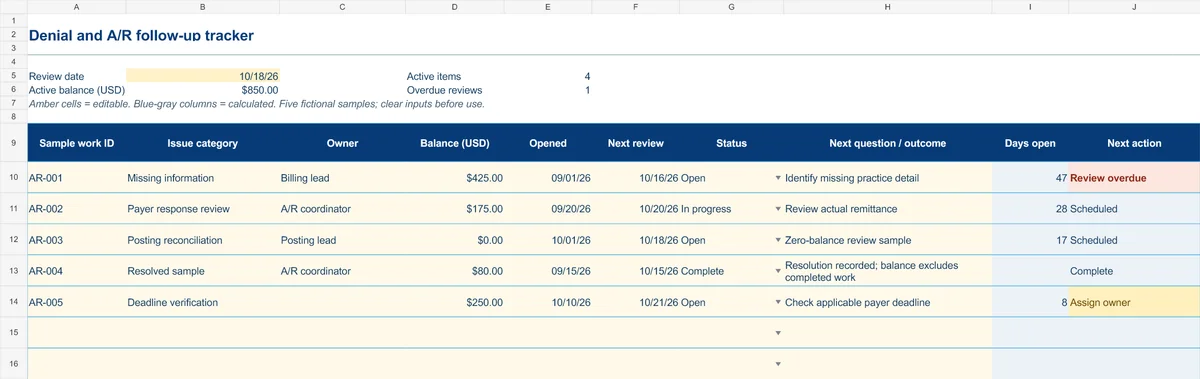
Start with the Instructions tab. Replace the five fictional samples, set your review date and keep the formula columns intact.
Free XLSX tool · No signup
Denial & A/R follow-up tracker
Plan anonymous follow-up work and make overdue reviews and missing owners visible.
- Fictional USD balances and active-balance summary
- Review dates chosen by your practice
- Calculated active items, age and next actions
Use anonymous process tasks. Keep PHI in approved systems. Includes instructions and fictional samples; no macros or live data connection.