

Identify the sources staff rely on
List the approved records used for scheduling, authorization tracking, documentation and billing. Confirm who updates each source and how the next team sees a change.
A calendar is useful for appointments but does not establish what treatment occurred or which service is billable. Avoid creating a second unofficial visit record in a general spreadsheet when the authorized systems already hold the necessary detail.
Make changes visible before the next handoff
Define how staff communicate a reschedule, a payer request or a relevant change to the administrative plan. The message should identify the question and the person who can answer it.
Do not rely on a conversation that another shift cannot see. An operational register can track that the process needs attention, while the patient-specific information remains in the appropriate practice and payer systems.

Move from the question to the next action
Keep authorization evidence distinct from assumptions
Record the actual request status, payer response and any conditions that need qualified interpretation in the approved record. A submission receipt is not an approval, and an authorization response is not a guarantee of payment.
Scheduling should receive an accurate administrative status and an escalation contact. Clinical urgency and care decisions must follow the practice’s clinical process rather than a spreadsheet’s overdue flag.
Route documentation and billing review properly
CMS maintains therapy-service resources for Medicare. A qualified reviewer should consult current applicable guidance for the documented services and payer context.
This workflow guide does not calculate therapy units, set visit limits or determine clinical necessity. The coordinator’s role is to ensure that missing records or unanswered questions reach the designated reviewer and that the authorized outcome returns to the staff who need it.
Use repeated exceptions to improve the process
At a recurring review, group operational issues by source: missing updates, unclear response owners or confusion between request receipt and decision. Assign a practical process improvement and check a later sample.
The enrollment and authorization register can track anonymous administrative projects and next reviews. Keep its “Complete” status tied to the defined task outcome, not to a conclusion that every planned visit is covered or ready to bill.
Illustrative workflow
A practical example.
Fictional workflow: a therapy coordinator receives a payer request after scheduling has already reviewed the calendar. The coordinator records the actual request and alerts the designated scheduling contact through the approved process. A clinician addresses any clinical question, and the administrative owner tracks the response. The next review confirms that both teams saw the updated status without treating a submitted response as an approval.
Put it into practice
- Identify the authoritative schedule, request and service records.
- Communicate changes to the next responsible team.
- Keep clinical, authorization and billing decisions distinct.
Inside the workbook
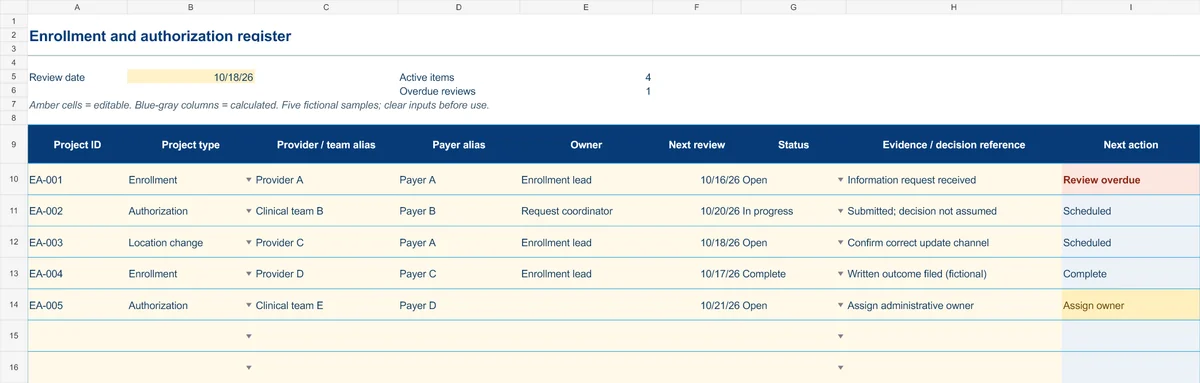
Start with the Instructions tab. Replace the five fictional samples, set your review date and keep the formula columns intact.
Free XLSX tool · No signup
Enrollment & authorization register
Track administrative projects from information gathering to a documented outcome.
- Project-type and status dropdowns
- Provider/team aliases and outcome references
- Calculated reminders for ownership and reviews
Use anonymous process tasks. Keep PHI in approved systems. Includes instructions and fictional samples; no macros or live data connection.